GUI
ayame-diff bundles a small local web app so you can compare files in the
browser instead of the terminal. The single-page app is embedded in the binary,
so there is nothing extra to install and no network access to the outside world.
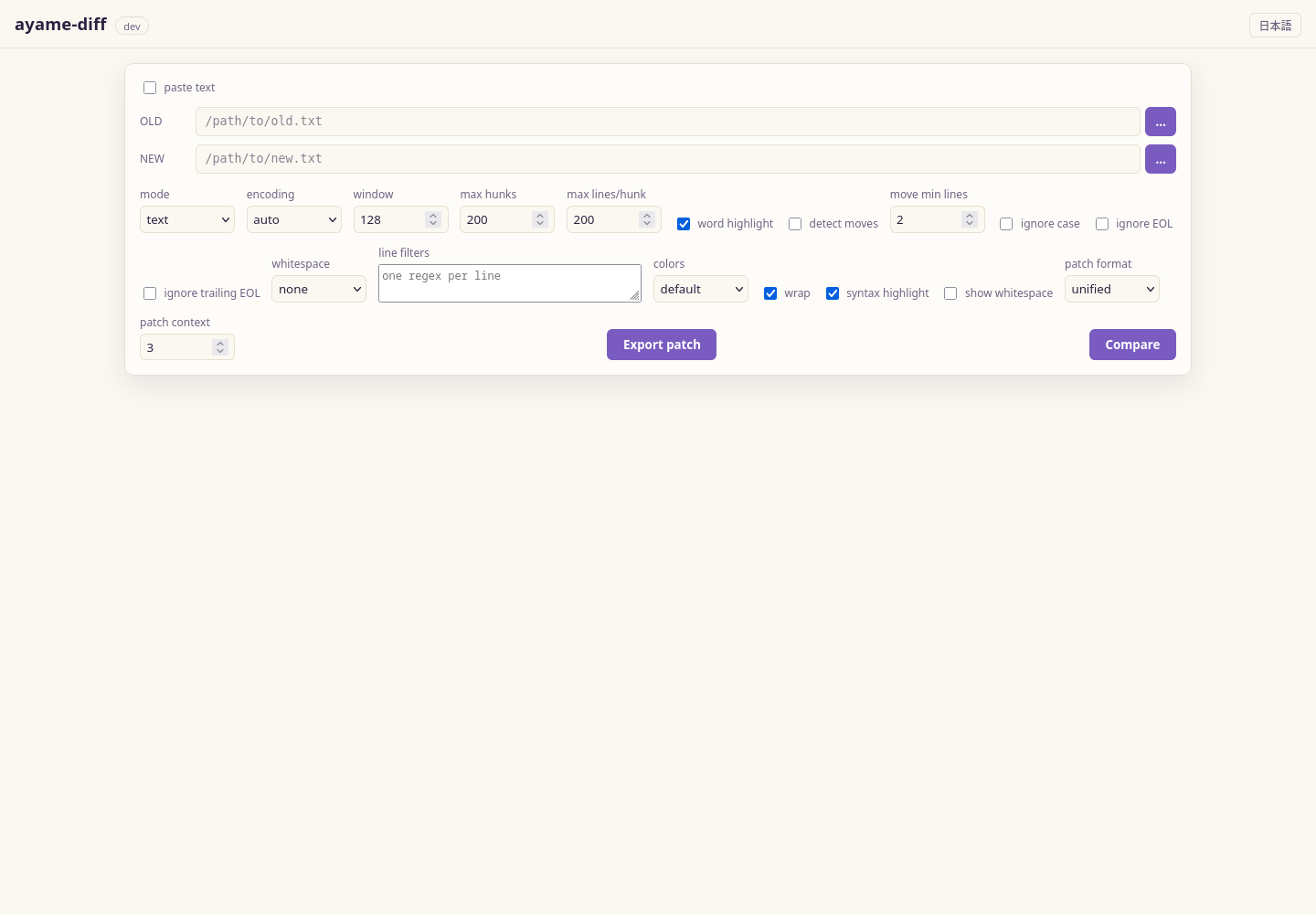
Paths are prominent before the first comparison; after that, editable sticky pane headers replace the initial path rail.
Two subcommands start it:
serve— start the server on a fixed address (localhost by default).gui— start the server on a free localhost port and open your browser.
Local, single-user use only
The server opens the file paths you type in the browser, so it binds to
localhost by default and is meant only for your own local use. Do not expose
it to a network. A non-loopback --addr requires --allow-remote and
prints a warning; anyone holding the URL can drive it, so place it behind
trusted network access controls.
Searching a result
Ctrl+F opens a search bar over the comparison result. Matches are highlighted
with a running count; Enter and Shift+Enter step forward and back, and Esc
closes. Toggles narrow it to changed lines only, make it case-sensitive, or
treat the query as a regular expression.
Matching runs against each line's whole text, so anchors ($) and patterns
spanning several syntax tokens work as written. The line-number gutter is not
searched, so a numeric query matches content rather than line numbers. The
number of highlighted matches is capped so a broad query on a very large diff
cannot undo the incremental rendering; the counter shows + when it applies.
Access control
Every run generates an API token, and every /api call needs it in an
X-Ayame-Token header. The token rides in the URL that gui opens and serve
prints, and the page keeps it in sessionStorage, so an ordinary reload keeps
working. Open the printed URL — a bare http://127.0.0.1:PORT/ in a fresh tab
has no token and the UI will say so.
Two properties follow from that design:
- No CSRF. A page on another site cannot set a custom header without a CORS preflight, which this server refuses. A cookie would have been attached automatically and would not have protected anything.
- No DNS rebinding. A loopback server also pins the
Hostheader to the address it bound. A page that makes its own hostname resolve to127.0.0.1still sends that hostname inHost, and is refused — even with a valid token.
The embedded page, its assets, and /api/health stay open: the page cannot set
headers for its own sub-resources, and the launching command polls health for
readiness before any browser exists. Neither exposes user data.
A --allow-remote listener does not pin Host, because the names it is
reachable under cannot be known here. The token is the defense there.
serve
Starts the web UI and keeps running until you stop it with Ctrl+C.
ayame-diff serve                       # http://127.0.0.1:8080
ayame-diff serve --addr 127.0.0.1:9000
ayame-diff serve --addr 0.0.0.0:8080 --allow-remote
| Flag | Default | Meaning |
|---|---|---|
--addr |
127.0.0.1:8080 |
Listen address (host:port). |
--allow-remote |
off | Explicitly allow a non-loopback listen address. The API token still applies; the Host pin does not. |
gui
Same UI as serve, but it picks a free localhost port and launches your default
browser — the "double-click to a GUI" experience without a native webview
dependency.
ayame-diff gui             # pick a free port and open the browser
ayame-diff gui --no-open   # start the server but don't open a browser
| Flag | Default | Meaning |
|---|---|---|
--addr |
127.0.0.1:0 |
Listen address; port 0 picks a free port. |
--allow-remote |
off | Explicitly allow a non-loopback listen address. The API token still applies; the Host pin does not. |
--no-open |
off | Start the server but do not open the browser. |
Using the web UI
Enter the LEFT and RIGHT file paths (or use the server-side file picker),
choose the mode (text, sorted, or csv / tsv)
and options (encoding, resync window, ignore-case, whitespace handling, EOL
controls, repeatable regex filters entered one per line, and for
sorted the numeric/reverse sort), then Compare. The result is shown as a
side-by-side grid with per-hunk headers, line numbers and word-level
highlighting. Syntax highlight adds line-local coloring for common source,
data, markup, and log formats; the file extension selects the language and the
toggle is remembered in the browser. It operates only on rendered diff rows, so
it does not scan or retain the complete input file. Choose patch format
(normal, context, or unified) and a
context-line count, then use Export patch to download an applyable
ayame.patch. Patch export preserves CRLF and missing-final-newline markers and
rejects binary/NUL input. Export is available in text mode only; a patch of a
sorted view would not apply safely to the original file.
After a result appears, the initial path rail is removed from the work area.
Each sticky pane header identifies its side and carries an editable path, a
server-side browse button, detected encoding and line count where available.
Press Enter or leave an edited field to compare that replacement immediately;
the ⇄ control swaps LEFT and RIGHT. Re-comparison restores the logical line that
was in view rather than returning to the first difference.
External changes
Auto-reload external changes is enabled by default in the View menu for
file-backed text, sorted, csv / tsv, and three-way comparisons. Saving a
compared file in another editor triggers one debounced re-comparison and keeps
the same logical row at the same screen offset. Atomic-save sequences and
several writes close together are coalesced before the comparison starts.
The browser uses authenticated fetch long polls, so the watch request carries
the same X-Ayame-Token as every other filesystem API. At most the three
BASE/LEFT/RIGHT paths are watched, and abandoned requests stop when the page,
paths, mode, or preference changes. If a future editable result has unsaved
changes, automatic replacement stops and a bar offers Reload or Keep
current edits.
Pasted text has no source file to watch. Folder comparison also stays manual: recursively polling an arbitrarily large tree on every save would violate the bounded-resource guarantees. Opening a changed folder entry as a text comparison watches that file pair normally.
Comparison URLs and browser history
After a successful file-backed comparison, the GUI stores the input paths, mode, and comparison conditions in a versioned URL fragment. Reload restores and re-runs that comparison. Comparing different inputs pushes a history entry, while condition changes replace the current entry, so Back and Forward move between complete comparison states.
The fragment is not sent to the server, but it does contain local paths. Copy link in the result toolbar warns about that disclosure and copies a URL with the API token removed. The copied URL grants no access by itself; open ayame-diff normally first so the browser session has its own token.
Pasted scratch text is intentionally excluded. URL state is capped at 32 KiB;
use an .ayamediff project for very large CSV column selections.
Applied ignore settings are shown in the result summary. They affect matching only: rendered lines and exported patches retain the original text.
Browser-dropped files are copied to a private local cache. Each file is limited to 2 GiB and one browser session to 8 GiB; an oversized upload returns a clear HTTP 413 error and its partial staged file is removed. Orphaned session caches become eligible for cleanup after 24 hours when a later session starts.
Navigating differences
The sticky navigation bar jumps to the first, previous, next, or last hunk and
shows the current/total and unread count. Keyboard shortcuts are Alt+Down,
Alt+Up, Alt+End, and Alt+Home; the ? button shows this list in the UI.
The location bar on the right draws markers directly from hunk indexes, supports
click-to-jump, and overlays the current viewport. Left/right text stays vertically
and horizontally synchronized because each hunk is rendered as one shared grid
and scroll row rather than two independent panes.
Enable detect moves to pair exact deleted/inserted blocks. Moved hunks use a
dedicated purple color and an ↔ button jumps to the paired location. Detection
is off by default; move min lines and the engine candidate cap prevent the
optional post-processing pass from dominating huge comparisons.
Manual alignment and ignored differences
When automatic resynchronization picks the wrong lines, click one line on each
side and choose Add sync. Sync points split the diff into independent
intervals, are listed as removable LEFT:RIGHT chips, and trigger an immediate
recalculation. Points must increase on both sides; the API and CLI validate
bounds and ordering. The CLI equivalent is repeatable --sync 100:120 using
1-based line numbers.
Each hunk also has Ignore this difference. Ignored hunks remain visible as
collapsed dashed headers, are excluded from next/previous navigation and unread
counts, and can be restored. Patch export omits them and records the count in
the X-Ayame-Ignored-Hunks response header, so the hidden decision remains
auditable; use declarative line filters (#28) for a permanent rule.
CSV / TSV setup and table result
Choose csv / tsv, then Inspect headers. The server reads only the first
logical record and reports detected format/parser and aligned columns. The
searchable column list supports all-column, selected-key, and excluded-key
modes plus Select all / Invert. Parsing, delimiter, compatibility, ignore,
tolerance, resource, temporary-storage, and output settings are available in
the same screen; Review settings summarizes the effective run.
The result is paged in groups of 100 logical differences. Changed cells alone
use the modification color, header badges show per-column change counts, and
changed columns only hides wide unchanged columns. The server caps the
browser response at 5,000 logical differences; Run and export writes the
complete TSV (with _changed_cols) or JSON Lines result to a local path.
See the GUI reachability and placement policy for the full mapping and the rules that keep advanced settings reachable without promoting every engine option onto the result screen.
Folder comparison
The folder mode accepts include/exclude globs, hidden-file policy, parallel
worker count, a five-way comparison method, named filter files/sets, and a
boolean metadata filter expression. Preview filter reports selected counts
and exposes a path sample before any content comparison. Folder settings can be
saved in a portable .ayamediff.json project. Results form an
indented, status-colored tree with status filters. Clicking a changed file
switches to text mode and opens the paired relative paths. Symbolic links are
skipped and .gz files compare decompressed content.
HTTP API
The GUI is a thin client over a small JSON API. You can call it directly.
GET /
Serves the embedded single-page app.
GET /api/health
POST /api/diff
Request body:
{
  "old": "old.txt",
  "new": "new.txt",
  "mode": "text",
  "encoding": "auto",
  "window": 128,
  "maxHunks": 200,
  "maxLines": 200,
  "numeric": false,
  "reverse": false,
  "ignoreCase": false,
  "whitespace": "none"
}
| Field | Type | Notes |
|---|---|---|
old, new |
string | File paths to compare. |
mode |
string | text (default) or sorted. |
encoding |
string | Same values as --encoding. |
window |
number | Resync window (default 128 when 0). |
maxHunks |
number | Max hunks returned (default 200 when ≤ 0). |
maxLines |
number | Max lines per hunk side (default 200 when 0). |
numeric, reverse |
bool | Sort controls, used when mode is sorted. |
ignoreCase |
bool | Ignore case when comparing. |
whitespace |
string | none, change or all. |
syncPoints |
array | 0-based { "old": N, "new": N } forced correspondences. |
ignoredHunks |
array | Stored hunk indexes omitted from patch/report output. |
Success response:
{
  "old_lines": 120,
  "new_lines": 118,
  "hunks": [
    {
      "kind": "Replace",
      "old_start": 10,
      "old_len": 2,
      "new_start": 10,
      "new_len": 1,
      "old": ["line a", "line b"],
      "new": ["line A"]
    }
  ],
  "hunk_count": 1,
  "omitted_hunks": 0,
  "added": 0,
  "deleted": 1,
  "modified": 1
}
Each hunk's kind is Insert, Delete or Replace, with old/new arrays
holding the affected lines (truncated to maxLines per side). The optional
move_detection_skipped: true field indicates that move detection was
requested but omitted hunks made a complete result impossible. Errors return
an HTTP 4xx status with a JSON body:
Example request
curl -s http://127.0.0.1:8080/api/diff \
  -H 'Content-Type: application/json' \
  -d '{"old":"old.txt","new":"new.txt","mode":"text","ignoreCase":true,"whitespace":"change"}'
POST /api/patch
Accepts the same path, inline-text, mode, encoding and comparison fields as
/api/diff, plus:
The response is text/x-diff with Content-Disposition: attachment. Valid
formats are normal, context, and unified; context is non-negative and
defaults to 3 when omitted.
CSV and file APIs
GET /api/files?path=...lists up to 2,000 local directory entries for the setup file picker.POST /api/watchaccepts one to three file paths and an optional priorbaseline. With no baseline it returns the current snapshot immediately; otherwise it waits up to 20 seconds and returns as soon as size, modified time, or mode changes. Re-submit the returnedsnapshotas the next baseline. Directories are rejected so one request cannot imply an unbounded recursive scan.POST /api/csv/inspectaccepts CSV setup JSON and returns first-record schema inspection without scanning data rows.POST /api/csv/diffruns the complete comparison and returns headers, summary/ranking, and at mostmaxRowslogical JSON cell differences (500by default, hard cap5,000).POST /api/csv/exportuses the same request plusoutput,outputFormat(tsvorjsonl), andoutputHeader, and writes the complete local result.
These endpoints deliberately accept local paths and are subject to the same local-single-user and explicit remote-mode warnings as the rest of the GUI.